Features
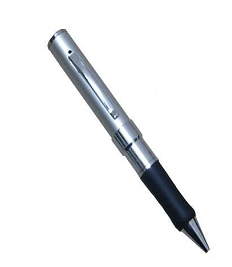
● Dimension:150mm*15mm*15mm
● Weight:30g
● Tiny size makes it ideal for a variety of uses.
● It’s great for use as a hidden cam, spy cam , etc.
● Real time recording in AVI video format
● Color video with voice lets you clearly see who’s there & hear
what they say.
● Place it up high or conceal it down low. With built-in rechargeable
battery so there’s no long cord for you to hide.
● Internal memory:1 GB or 2 GB
● Playback video on PC
Camera Technical Parameter
● Video compression : AVI video format,600*480
● Voice recording: Yes
● Internal memory: Yes
● Flash:1 GB or 2 GB
● Video file size; >500KB per min
● Recording mode :continuous recording until memory is full or
manually off
● Adaptor type: USB adaptor charging cable
● Battery type : Lithium-ion
● Record time : up to 5h
● Battery use time : about 3h
A Quick Look at your Mini Pen Interview Recorder 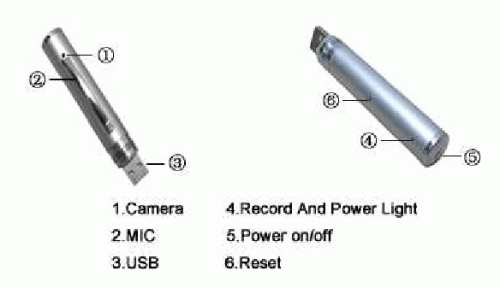

Starting your Mini Pen Interview Recorder
What your mini interview recorder includes?
● Mini interview recorder
● USB cable
● USB manual Step 1:
Press the switch, it begins to kinescope as soon as being turned on.
The blue light will turn on during kinescoping.
Step 2:
Press the switch again, it will begin to save data and then turn off, at
this time, the light turns to yellow, reflect that the pen DVR is at
sleeping status(that means do not kinescope or shut down neither).
Step 3:
If need to kinescope again, press the switch once more, then can come
back to kinescope , during this time ,the light will turn to blue again.
Step 4:
Hold down the switch for 5s , then the power switch is off ,after
shutting down the pen DVR , there is no guide light.
Step 5:
When finish charging the battery , the light stops glittering and the
yellow light keeps on ,which means that battery is fully charged.
Step 7:
It will turn off itself when the battery has been used up. And will save
the kinescoped files before automatically shutting down.
Brief introduction
1. The fewest mini DVR in the world which conceals in the
pen .And the first mini pen DVR with the function of both
kinescope and record.
2. The high fidelity microphone can record the sound around 15
㎡.And the high clear kinescope can help the police and court to
get evidence.
3. The fancy aspect , smooth pen writing function ,exchangeable
standard lead is all durable and environmental.
4. Suitable for any computer and electron device with USB port.
USB2.0 standard port, need no drive or circumscribed electric
power source neither.
5. 2 million pixels for the camera.
3
Connect to PC with USB cable
1. Connect the machine to the computer with USB cable. The
machine is in the state of charging while the yellow light is
twinking.(You can also directly charge the camera using an
adaptor accorded with the specifications of USB).Charging 2
hours is necessary.
2. Function as removable disk when connect the camera to PC,
playback the video files stored flash via the computer.(Free
download the BAOFENGYINGYIN software from the
http://www.baofeng.com).
3. Advice use the charger
FAQ
Q : Can the video file which is recording be stored if the battery is out
suddenly during using?
A : Don’t worry . if the battery use off suddenly it will store the
recording video files before it turns off.
Q : How to deal with the situation of system halted?
A : Please use “RESET” button then push the on/off switch , so it will
work again.
Q : Which form can be chosen to format?
A : Please use form “FAT” to format.
Attention
Do not switch “RESET” button when the machine is recording ,
otherwise the data won’t be saved.
Henry M
August 21, 2009 at 12:52 pm
Nitin(post92)-Have you solved your date/time problem?
aspromonte
August 25, 2009 at 2:22 pm
Sorry Johnserr (post 89), in my case it doesn’t work. Any suggestion to remove the date display on the video?
userconfig.txt with the standard time set line works to set the time but the display Y/N option does not work on this model.
joaquin
August 30, 2009 at 12:22 am
open a notepad.
type the date and time.
e.g. 2009-08-30 11:58:40
click File, Save as.
name it e.g. userconfig.txt
and save it in drive D: or your documents.
insert you spy pen to USB port.
open Mycomputer.
try to look where your spypen icon, e.g. drive F: or G:
right click the userconfig notepad, click copy.
right click the spy pen icon in you mycomputer, click paste.
switch off the spy pen button. remove from the USB port.
insert again the spy pen, switch off again, remove from the USB.
then try to record, then insert again to USB. Voila see the time…
Marcelo Leite
September 6, 2009 at 8:57 am
What can I do to recorder in 3GP format. The manua ssy that the video compression can be AVI or 3GP format.
I would like to know if is it possible to put the date in automatic updating, when the recording is made?
shashi
September 8, 2009 at 10:38 pm
plz provide me the detail of this product on my mail id
with price & telephone no
Graham
September 11, 2009 at 4:57 pm
Mine seems to have a limit, it stops recording at 207mb, the file is corrupt and cannot be viewed, any ideas?
alessandro_gr
September 18, 2009 at 2:18 pm
I tried the software from the zip. Then I disconnected. Then I turned it off and on, and then reconnected it to the PC. Then I copied the userconf.txt into the root directory (my pen has one folder on it called VIDEO). Followed the instructions, but the file did not disappear and no changes occurred. What am I doing wrong? Anyone who can help please email me
alessandro_gr
September 18, 2009 at 2:19 pm
I tried the software from the zip. Then I disconnected. Then I turned it off and on, and then reconnected it to the PC. Then I copied the userconf.txt into the root directory (my pen has one folder on it called VIDEO). Followed the instructions, but the file did not disappear and no changes occurred. What am I doing wrong? Anyone who can help please email me [email protected]
ricky
September 20, 2009 at 12:53 pm
i went http://www.videolan.org as IAN (number 54) and donloaded the free software for my spy pen recorder and it worked perfectly, no problem with dates. thanks IAN
Chemna
September 21, 2009 at 6:13 am
I had the same problem with time and date, I solved it renaming userconfig.txt to time.txt. The date and time format is YYYY-MM-DD HH:MM:SS.
Oseo
September 24, 2009 at 12:06 pm
I charged this thing and it wont turn on! No lights of any color! I used the charger. Someone already posted this before. What the hell is the problem with this machine? Hey stand behind your product and answer the question…
talkshow
October 1, 2009 at 2:43 pm
I have tried everything in here and still cannot get the time/date to either change or turn off any other idea’s?
rodrigo valencia
October 2, 2009 at 10:22 am
I need to know the price of the product, and life time of pen
rodrigo valencia
October 2, 2009 at 10:23 am
Hello
I need to know the price of the product and the life time the same
Michael
October 6, 2009 at 8:52 am
Thanks to Jim – I have been struggling with this, and it turned out my pen required “setdate.txt”
Much appreciated!
Barry
October 13, 2009 at 5:33 pm
Hey everyone to solve the date and time look at JIM post above. it definatley works. every pen must have a different txt name that works for that pen. look for the one that dissappered after to plug it in after recording and thats the one u use.
Many Thanks JIM
phil
October 16, 2009 at 11:26 am
my pen worked with “setdate.txt” and the following writen in it:
2009-10-16 12:00:00
ROB
October 20, 2009 at 2:10 pm
I just got my pen this pen and i put to charge and yellow light comes on but only when plugged in on charger on when inserted on USB port other than that i do not see any lights, or noise going on or off…can some explain how do i get this pen to work “turn on”…thank you
Bert
October 27, 2009 at 3:59 pm
John,(94) orJason(98) got the same problems have you solved the problem or is my time better spent hitting my head with a brick…been lookin for a fix for a week,the only way it will connect to pc is with the top button pressed as it connects to usb,then i have the 3 files,tried various content of these files from dealextream webforum to no avail…when its not connected to pc yellow light stays on onlyshuts down with reset button,
If you have had no joy,at least you know “You are not alone” Please reply.
Bert.
Biren
November 10, 2009 at 6:09 am
can u please send me price and how to order this pen please.
Thanks
Biren
Gimlet
November 21, 2009 at 1:50 pm
setdate.txt was the one that dissappeared for e but I still can’t find the right format for the date.
Valter
December 3, 2009 at 3:41 am
i buy the pen but i can’t adjust the data ( give me every time 1980.01.01
How can i adjust the correct data?
vinode
December 3, 2009 at 4:29 am
i have a m9 2gb digital pocket video recorder its loss the system file how to install
chabio
December 3, 2009 at 8:25 pm
I need the software in english please – I am presently testing this pen and will most likely order 500 more if it works well and the software is in english. Please send the link ASAP. thanks
reza janati
December 21, 2009 at 9:35 am
I need the software in enghlish please
Max
December 24, 2009 at 11:41 pm
Hey! I was given this as a Xmas present but my computer is not recognizing the software disk . Is there a link where i can download it?
many thanks for a great product.
awat hamajaza
December 25, 2009 at 12:22 am
my pen is 4gb dvr. to set atime write in notpad 2009-12-24 13:00:00 there is just aspace between date and time you closeit save it named time.put it in apen in pc not in amove or recorded file.then u close pen drive in toolbar .then getit out .put it again in the toolbar says notrecognize it thatis agood sign because we do take effect .remveit record some thing and u will see the time iscorected. for beter sound use VLC mediaplayer donload K-lite Codedec pack 5.5.1.0 it s alatest version .also mediaplayer11 >one of these will solve sound problem maybe the picture who has no picture . thanks for evry one effort from kurdstan
Trent
December 31, 2009 at 7:52 am
Belive me, I have the exact pen as in the pic. comment #18 DOES work if you follow step-by-step with the right amount of spaces and dashes.
muhammad
January 15, 2010 at 4:35 pm
Hi, I use a Macintosh computer, and I cant get this pen to be seen by the computer. how do I use its video file on a window
sergio z
January 19, 2010 at 2:20 pm
Hello there … time and date : instead of using the YYYY-MM-DD HH:MM:SS format, just ad a dash ” – ” between date and time like this: YYYY-MM-DD-HH:MM:SS
Let us know how it works.
Regards from Brazil
nirmal
January 20, 2010 at 9:05 am
how i can change my date and time in spycam mp9, i dont have any userconfig.txt file. pls provide me this file
Beamer
February 27, 2010 at 8:07 am
First pen only recorded 3 min then would shut down and the yellow light stayed on returned it and got an other this time yellow light blinked, charged and got a recording time of 46 min the quality control of this mini pen recorder is so bad that eithier you get one that works or is a leamon I ownly paid $37 us dollars of this and that,s about all its worth where they get a battery use time of about 3 hr,s ? and you could get 5 hr,s of recording time with the storage of this recorder ? if you keep charging it the most recording time I got was 46 mins
Yogesh
February 28, 2010 at 2:33 am
I have a proble in recording. When the blue light turns on, it wont turn off despite pressing the off button and it remains on, only I have to press the reset button everytime. But it records clips for only 2 or three seconds. More than 10 seconds recording, the blue light does not get off. How to solve this problem??
diego
March 1, 2010 at 10:05 am
hola les cuento mi caso tenia mi pluma conectada al pc y alguien la desconecto sin usar el quitar harware con seguridad, desde entoces mi pluma no la reconoce el pc solo enciende la luz naraja sin parpadear estando conectada al pc, no graba se queda en luz naraja y no da señales de vida puedo entrar a sus 3 unidades usando el boton de ensendido mientras la conecto al pc los archivos de recor,system, majic pero creo q estan corructos alguno me puede enviar los archivos de estas 3 unidades para remplasar los mios aver si la resucito thx [email protected]
diferquin
March 1, 2010 at 10:09 am
Hi I tell my pen my case was connected to pc and someone disconnected without using the safely remove hardware, from my pen entoces the pc does not recognize it only turns on the light without blinking Orange remain connected to the pc, does not record light stays on Orange, with no signs of life can enter their 3 units Ensenada using the button while connected to pc files of remembering, system, but I think Majic corructos q are any files you can send me these 3 units for the mine remplasar thx to see if the resurrected [email protected]
John
March 23, 2010 at 2:34 pm
The instructiions at http://www.baofeng.com are in Chinese. I need English instructions.
Antonio Oliveira
April 5, 2010 at 7:07 pm
Please help me I’m not an expert on this. My pen shows me the wrong date and time. (2009-01-01)
Please advise me where I can find a file that will allow me to set time+date and let me know how to do it. My 8 GB Camera Pen Micro DVR. Did not come with a userconfig.txt file in the computer is showing only the recorded file, only the drive not any system file. Please tell me where the root directory is and where I have to save the file that is useconfig.txt. Thank you
Richard Lee
April 23, 2010 at 4:28 pm
where do i get BAOFENGYINGIN Software in ENGLISH as a download? The Pen is useless without it.
oscar
April 26, 2010 at 7:28 pm
Hi, I’m frome mexico and I just buy my pen, but I don’t know how to use it and it came with a cd that have a software STORM II but there is a problem is in chinese and there’s another problem my laptop didn’t recognize it, I think it didn’t because I use Windows Vista, please help me, I spent a good quantity on this
Bardia
May 5, 2010 at 10:17 am
If You have a problem with changing Time and Date then you can make a .txt file and call it for time.txt
I had the same problem with time and date. The date and time format is YYYY-MM-DD HH:MM:SS.
arthur bohringer
May 9, 2010 at 1:24 pm
my yellow light wont change to any other color it stays on solid
wont go to record
tryed reset same thing
when pluged into computer light goes on solid
seems to be stuck
help
help
amos
May 12, 2010 at 4:47 am
Please instruct me how to download the software to activate the video option in the MP9 with 4G memory.
nickol
May 12, 2010 at 4:53 am
ich kann die software einfach nicht laden,habe laufend
google earth auf dem bildschirm.
rob
May 17, 2010 at 6:28 am
having troublefinding clear instructions on how to download ..look forward to reply . regards Rob
sun
May 30, 2010 at 1:32 am
My spy pen do not record. Its blue light disapperas in few seconds what to do
Sas
June 2, 2010 at 9:42 am
Can someone tell me where can i find the Baofengyingyin or similar program to download. I just purchased a pen and cannot view anything.
sas
June 8, 2010 at 11:23 pm
Its working. However the sound track is bit advance than the video. Hence cannot hear the original voice. pls someone tell me how to correct this.
Manmohanjit Singh
June 15, 2010 at 1:52 am
m
y dv pen camera is not recording new records but show only old recordings so any one tell me what to do I have reset it thrice & how yo set the curent date
DEEPAK
June 30, 2010 at 10:55 am
Can u tell me where i can get the cd of this product mini pen interview recorder so that i can use it as a web cam or more
DEEPAK
June 30, 2010 at 10:59 am
Can u tell me where i can get the cd of this product mini pen interview recorder so that i can use it as a web cam or more
my mail id is
[email protected]
please help me