Features
● Dimension:150mm*15mm*15mm
● Weight:30g
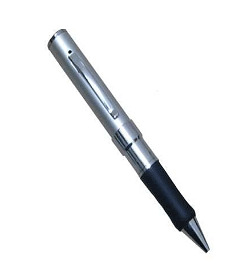
● Tiny size makes it ideal for a variety of uses.
● It’s great for use as a hidden cam, spy cam , etc.
● Real time recording in AVI video format
● Color video with voice lets you clearly see who’s there & hear
what they say.
● Place it up high or conceal it down low. With built-in rechargeable
battery so there’s no long cord for you to hide.
● Internal memory:1 GB or 2 GB
● Playback video on PC
Camera Technical Parameter
● Video compression : AVI video format,600*480
● Voice recording: Yes
● Internal memory: Yes
● Flash:1 GB or 2 GB
● Video file size; >500KB per min
● Recording mode :continuous recording until memory is full or
manually off
● Adaptor type: USB adaptor charging cable
● Battery type : Lithium-ion
● Record time : up to 5h
● Battery use time : about 3h
A Quick Look at your Mini Pen Interview Recorder 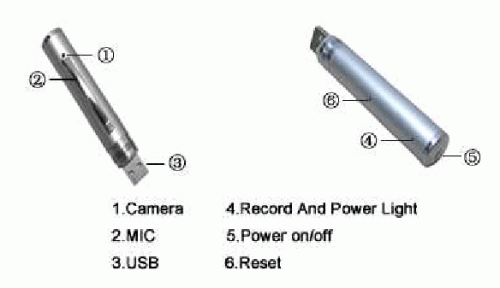

Starting your Mini Pen Interview Recorder
What your mini interview recorder includes?
● Mini interview recorder
● USB cable
● USB manual Step 1:
Press the switch, it begins to kinescope as soon as being turned on.
The blue light will turn on during kinescoping.
Step 2:
Press the switch again, it will begin to save data and then turn off, at
this time, the light turns to yellow, reflect that the pen DVR is at
sleeping status(that means do not kinescope or shut down neither).
Step 3:
If need to kinescope again, press the switch once more, then can come
back to kinescope , during this time ,the light will turn to blue again.
Step 4:
Hold down the switch for 5s , then the power switch is off ,after
shutting down the pen DVR , there is no guide light.
Step 5:
When finish charging the battery , the light stops glittering and the
yellow light keeps on ,which means that battery is fully charged.
Step 7:
It will turn off itself when the battery has been used up. And will save
the kinescoped files before automatically shutting down.
Brief introduction
1. The fewest mini DVR in the world which conceals in the
pen .And the first mini pen DVR with the function of both
kinescope and record.
2. The high fidelity microphone can record the sound around 15
㎡.And the high clear kinescope can help the police and court to
get evidence.
3. The fancy aspect , smooth pen writing function ,exchangeable
standard lead is all durable and environmental.
4. Suitable for any computer and electron device with USB port.
USB2.0 standard port, need no drive or circumscribed electric
power source neither.
5. 2 million pixels for the camera.
3
Connect to PC with USB cable
1. Connect the machine to the computer with USB cable. The
machine is in the state of charging while the yellow light is
twinking.(You can also directly charge the camera using an
adaptor accorded with the specifications of USB).Charging 2
hours is necessary.
2. Function as removable disk when connect the camera to PC,
playback the video files stored flash via the computer.(Free
download the BAOFENGYINGYIN software from the
http://www.baofeng.com).
3. Advice use the charger
FAQ
Q : Can the video file which is recording be stored if the battery is out
suddenly during using?
A : Don’t worry . if the battery use off suddenly it will store the
recording video files before it turns off.
Q : How to deal with the situation of system halted?
A : Please use “RESET” button then push the on/off switch , so it will
work again.
Q : Which form can be chosen to format?
A : Please use form “FAT” to format.
Attention
Do not switch “RESET” button when the machine is recording ,
otherwise the data won’t be saved.
Joyia
May 28, 2008 at 10:32 am
Please Send me the prices of your products and minimum Qty of purchasing for Pakistan Karachi.
Please Send me the prices of your products and minimum Qty
June 11, 2008 at 7:11 pm
will like to test for Quility of video & Audio
CTO International Co., Ltd
June 11, 2008 at 7:20 pm
Thanks so much for your enquiry and interesting!
Please kindly send your enquiry by email so that we can quote the exact price to you
!
Best regards!
CTO International Co., Ltd / Sales Department
Naofal Alyassi
June 16, 2008 at 6:45 pm
Hi:
I have this pen, but it seems it is showing the wrong date and time when playing the video, how to setup the date and time ?
Though it is working ok.
Thank you
Gio
June 23, 2008 at 4:44 pm
Hi,
Also wondering how to setup the date and time. The userconfig.txt file described in the instructions is not to be found in the memory although it works fine.
Thanks.
Melvin Chan
July 10, 2008 at 12:50 am
Hi:
I have this pen too , I need to know how to set the date and time ,only i can import this item
Thank you
Sergio
July 19, 2008 at 4:00 pm
Dear
Open the userconfig.txt at CD driver, modify de date and copy for pen, and off de pen
My pen record more 3 second, how change the time of de record for 2 hours?
Sandy
July 19, 2008 at 11:08 pm
Hi, I use a Macintosh computer, and I cant get this pen to be seen by the computer. how do I use its video file on a mac. regards, Sandy
Peter
July 22, 2008 at 3:26 pm
I need to set the date and time as well. Can someone please post the contents of the userconfig.txt that is described in the manual but does not exist on the unit’s flash? I have no idea what that file is supposed to contain, because it doesn’t exist on my pen dvr. Thanks in advance
jeff
July 25, 2008 at 5:00 pm
I also have the same question as the others….How do you set the time and date on the camera. It seems like a fine piece of equipment .. It just would be real nice to have the proper time and date..
Nicol
July 27, 2008 at 2:52 pm
My pen has not come with CD so how to adjust the Date/Time? Can someone send its contents to [email protected]?
Amit
August 1, 2008 at 9:37 pm
I edit userconfig.txt and copy it on the pen many times. It is not stamping the date and time. when i copied the userconfig.txt to pen drive, then open it again the file disappear from the pen drive. Please help……………….
stuart hemming
August 2, 2008 at 5:59 am
i cant seem to get my pen to play back video? it records the sound fine but no picture?
zeeltom
August 4, 2008 at 9:11 pm
How set date and time?
userconfig.txt not work.
Zaphod Beeblebrox
August 5, 2008 at 5:10 am
If anyone can post here what the format of the “userconfig.txt” file is, I’d greatly appreciate it. The pen I have came with no instructions whatsoever, but works fine (though it’s irritating having the time/date in the corner of the video being wrong).
Peter
August 5, 2008 at 1:33 pm
Hi there, I’ve pressed reset any the light is constantly yellow and my laptop won’t pick up that Ive plugged it in and I’m really quite cheesed off please help.
zeeltom
August 7, 2008 at 1:39 pm
Is possible make full reset this pen?
revohunter
August 14, 2008 at 9:47 am
The way to set the date and time is the following: create a text file at the top level of the pen drive called userconfig.txt. Inside text should be set to day YYYY-MM-DD HH:MM:SS for example 2008-08-14 14:25:00. Save this file. Correctly remove the Pen Drive from the computer. Turn the Pen Drive off and then back on. It should now record with the correct time stamp. You will also notice that the userconfig.txt is gone from the top level of the pen drive.
zeeltom
August 19, 2008 at 10:30 am
Sorry. This method not work in my pen. I have date 2029 year and nr of file avi VIDEO_REC_000088.AVI and go up in next record. How make full reset this pen?
mpls
August 20, 2008 at 3:40 pm
not sure how to find drivers and update the time and date please advise
mpls
August 20, 2008 at 4:22 pm
Ive lost my time and date all together
techcapsule
August 20, 2008 at 9:59 pm
I spent hours trying to figure out what was wrong with this and had the same problem. Here is how I fixed it.
First you need to update the spy camera drivers. The website to do that is pasted below.
http://www.eyespypro.com/faq/questions/12/DVR+Pen+Software+Update
Follow these instructions to update your software:
DVR Pen Software Update
Article Details
Last Updated
4th o July, 2008
Would you like to…
Print this page
Email this page
Post a comment
Subscribe me
Add to favorites
Remove Highlighting
Edit this Article
Quick Edit
Export to PDF
User Opinions (1 vote)
100% 0%
——————————————————————————–
How would you rate this answer?
Helpful
Not helpful
Help us improve. Why was this unhelpful?
Thank you for rating this answer.
There is a software update that you download here.
Once you expand the document follow the instructions below. This is direct from the factory and we have not tried it yet.
First, update the software of PEN DVR :
Press the Power switch of the pen until you put the Pen USB to the PC
The PC will find three disks, In the first disk, please delete the old software, and copy the updated two software name°® AkResData.Bin°¶ and °•Magic. Bin°¶ and save in the first disk. In the second disk, please delete °•system°¶ file.
*The rar file also contains a userconfig.txt file that you will need to edit and place into the same folder as the folder with the document that is written in chinese. MAKE SURE YOU ONLY CHANGE NUMBERS DO NOT ADD ANY SPACES OR IT WILL NOT WORK!!!
Disconnect the Pen DVR from the PC, and then power off the PEN, and then power on. Then update is done.
Once you have followed these instructions disconnect the pen from your computer and power down
THIS NEXT STEP IS IMPORTANT !!!
once the pen is powered down press the reset button or the device will not be recognized after the update and you will receive an error message!
Power up your pen and record 20 seconds of video then power down and reconnect to computer.
Check your folder for the new file (my files had a new extension after the update for example : AX00001
You should find that the timestamp has returned!
good luck and I hope this helps … i wish someone had written a detailed listing like this for me!
techcapsule
August 20, 2008 at 10:04 pm
******please disregard the posting above i pasted some extra stuff that didnt belong use this guide instead**********
I spent hours trying to figure out what was wrong with this and had the same problem. Here is how I fixed it.
First you need to update the spy camera drivers. The website to do that is pasted below.
http://www.eyespypro.com/faq/questions/12/DVR+Pen+Software+Update
Follow these instructions to update your software:
First, update the software of PEN DVR :
Press the Power switch of the pen until you put the Pen USB to the PC
The PC will find three disks, In the first disk, please delete the old software, and copy the updated two software name°® AkResData.Bin°¶ and °•Magic. Bin°¶ and save in the first disk. In the second disk, please delete °•system°¶ file.
*The rar file also contains a userconfig.txt file that you will need to edit and place into the same folder as the folder with the document that is written in chinese. MAKE SURE YOU ONLY CHANGE NUMBERS DO NOT ADD ANY SPACES OR IT WILL NOT WORK!!!
Disconnect the Pen DVR from the PC, and then power off the PEN, and then power on. Then update is done.
Once you have followed these instructions disconnect the pen from your computer and power down
THIS NEXT STEP IS IMPORTANT !!!
once the pen is powered down press the reset button or the device will not be recognized after the update and you will receive an error message!
Power up your pen and record 20 seconds of video then power down and reconnect to computer.
Check your folder for the new file (my files had a new extension after the update for example : AX00001
You should find that the timestamp has returned!
good luck and I hope this helps … i wish someone had written a detailed listing like this for me!
Paulo
August 23, 2008 at 11:27 am
Hi, I have a Macintosh computer, and I cant get this pen to be seen by the computer. how do I use its video file on a mac. regards, Paulo
Lank
August 26, 2008 at 7:12 am
Is it possible to reset completely the DVR? Is it possible to configure time (on-off) light and others parameters (light-contrast) ? Please tell us about…
Lank.
zeeltom
August 26, 2008 at 10:30 pm
Hallo?
Lank
August 27, 2008 at 1:32 am
Anybody have the original file stored in System directory?
Thanks, lank
One of supplier
August 27, 2008 at 12:11 pm
Actually, it could not be adjusted the date and time after leaving manufacturing plant. It is just a not complete successfully product in this stage. you should ignore this feature in this moment.
zeeltom
September 2, 2008 at 11:36 am
My cokputer find only one disk.
This pen is shit.
How make full reset???????????
Andre Carvalho
September 8, 2008 at 2:25 pm
***** SPYPEN 4GB – DATE AND TIME UPDATE *****
Who have a spy pen that could not be updated with USERCONF.TXT, try to use a diferente name of file with this instruccions above:
files -> SysTime.txt
Internal format of date and time -> YYYYMMDDHHMMSS (example 20080908100000 = 2008-09-08 10:00:00)
Put this file to the / directory in the syp pen usb disk drive, turn off it.
After reboot the spy pen wil be updated to the new date and time, and the SysTime.txt automatically deleted.
Goog Lucky
AJ Anderson
September 8, 2008 at 3:40 pm
Is the BAOFENGYINGYIN software available in English …if yes – please send link.
khushal vyas
September 11, 2008 at 6:48 am
Need to buy ten units at Nagpur, India, please quote the price
Ahmed
September 17, 2008 at 7:18 am
My pen has not come with CD so how to adjust the Date/Time? Can someone send its contents to [email protected]
Ahmed
September 17, 2008 at 7:23 am
can somebody send me the link in where can i get the software of my pen from, because my pen comes with no cd. thank you
please send the link to [email protected]
Ahmed
September 17, 2008 at 7:28 am
when i press the record button the light orange light goes on and i have to wait 10 second for the blue light to appear and start recording, is there any one can tell me what i have to do to kame it record more in one or 2 second after pressing the on button. I’d greatly appreciate it
thank you [email protected]
macgyver
September 17, 2008 at 6:40 pm
Everyone seems to be having problems with this date and time stamp thing. I think you’re all doing what I did initially, which is to type the date and time with seperators (“-” and “:”) into the txt file. Just type in the year, the month, the day, the hour (in 24hr format), the minutes, the seconds. For example: right now in Australia, it is 11:37 and 20 seconds on 18 September 2008 – My txt file for this would be 20080918113720. Note that it’s just the relevant numbers in the relevant order. Save the file as either “userconfig.txt” or “Systime.txt” and put it in the relevant removable disk assigned to the pen. Then just remove the pen and shoot a quick movie to make the file put the date/time stamp into the pen.
EyeSpyPr0
September 19, 2008 at 12:45 pm
Hi guys, this pen won’t work at all w/ a Mac. Only PC. For what it is, it works great, though the Updated PI Camstick has better audio and is now 640 x 480 and will work with a Mac or a PC. We have those on the site also. The BallCam DVR records @ 30fps, where the pen does only 15 fps.
We posted the updated drivers on the site & the link above was posted by one of your readers, which we thank you for. We will always try and have a current driver for our customers, and anyone else that needs it.
If you have specific questions or if we can be of any help in getting the pen to work, visit our website and send me a message with the contact form.
Chris Winkler
http://eyespypro.com
Troy
September 20, 2008 at 4:14 pm
Hi, I have the MP9 version of the pen, and it appears to use the same firmware files. Is there a way of getting the device to record at 25 or 30 frames/second. I know this is going to reduce the length of time recorded, however, I don’t want it for spy purposes. I require a decent SMALL camera for mounting on my RC planes and Heli’s. I have an eDVR 5-in-1, but it only records 5mins worth (128MB) of video.
Has anyone got a 30fps recording firmware? I don’t mind losing audio if it means i can have faster framerates.
DVR says
September 22, 2008 at 1:07 pm
<<>>
Thank you revohunter. It worked perfect.
Ram Milan
September 26, 2008 at 6:13 am
Thanks , it works
Luiz Gomes
September 30, 2008 at 3:46 pm
I had problem when setting date and time and I solve using the follow text/format on userconfig.txt file:
Show Time:Y
2009-09-30 21:36:50
Good Luck!!
Nicol
October 9, 2008 at 2:35 pm
A guy named “macgyver” on top he helped me solving the Date and Time. I don’t know why there are so many different ways to solve this problem, maybe there are few different software in DVR pen. One more thing is it could not be activated when I creating a txt file, but it would be functioned when I using the txt file from “macgyver”……a good guy, thx.
Alexios Panagopoulos
October 11, 2008 at 6:16 pm
My purchase did not include the cd, I would like to download the file to run my recorder on my laptop.
Frenchman
October 13, 2008 at 12:39 pm
Thanks very much to techcapsule and revohunter, that was very helpful for me. It works !
karloz25
October 13, 2008 at 8:52 pm
I have a Silver 4gb DVR PEN.
To change the Date and Time, follow this:
Make a Text document.
Type in: 20081013205430 (format is 2008-10-13 20:54:30)
Save it: SysTime.txt (you may not need the extension)
Place it in the Pen Drive Main Root (no folders)
Safely remove the drive, power off/on, record sample…
Your time is now changed!
nidd
October 15, 2008 at 5:19 pm
I got my pen but it wont turn on at all?! I have no idea why it is not working….Any ideas?
When i plug it into the charger I get a solid red and a solid green light on the charger…
I have never seen any lights on the pen light up..
David
October 16, 2008 at 1:19 pm
I just got my spy pen and it will record, but I can not see the video when I paly it back on my PC. Can anyone help me out with this. I tried the instructions but still no luck. Maybe a phone call could simplify this matter. Please email me if you have a solution for me.. Tks,
Mike
October 17, 2008 at 9:42 am
I have the same problem.
It records ok, but I can only see the audio ?
I am using Vista with Windows media player that has been upgraded.
Do I need a specific plug in?
I try with a XP machine and I get the same results?
Anthony
October 20, 2008 at 9:16 am
Does anyone have a problem erasing previous recordings? I started using the pen when I got is a couple of weeks ago and have about 20 recording that I do not need. I’ve tried pushing the reset button numerous times to no avail. When I record something new, I have to scroll through every previous video just to see what I’ve just recorded. I have the disc, but can’t seem to navigate in the software. Any help would be greatly appreciated. I also can’t set the date and time, but that is not a vital feature to me.
Anthony
October 20, 2008 at 10:30 am
I’m guessing that this pen is a single-use, limited life item which will record up to three hours of video and nothing more. The reset button is not functionable and is just there as a useless gimmick. Does anyone else have a problem deleting old videos on their pens?